Please note that most of the app content is available in Japanese only.
However, you can view English-taught sessions by selecting "English Program" from the menu.
You will only need to enter the password to browse abstracts. You can find the password in the following locations:
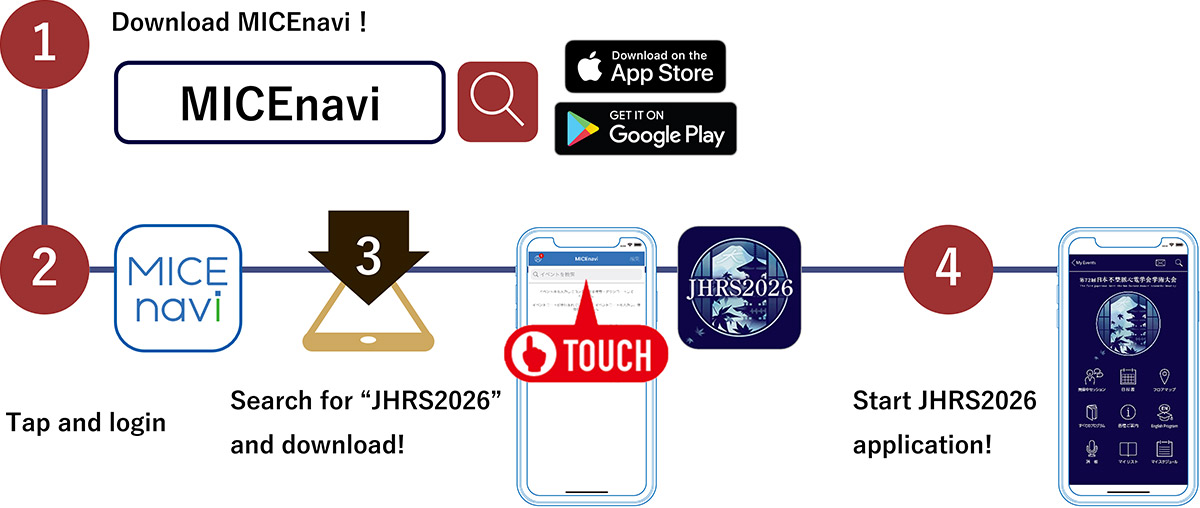
Go to the Apple App Store / Google Play Store on your mobile device. Type “MICEnavi” into the search bar and “MICEnavi” icon will appear. Please download and install the MICEnavi app onto your device.
Search for our congress app by typing “JHRS2026” into the search bar. You will see an event come up with our JHRS2026 logo. Tap on JHRS2026 and download.




| Compatibility | For iOS version 16.0 and above For Android version 9.0 and above |
|---|
https://www.micenavi.jp/contact
ACE Enterprise Co.Ltd
E-mail: jhrs2026@ace-enterprise.co.jp
